
Why User Acceptance Testing Plays a Critical Role in Successful Software Product Delivery

TL;DR
User Acceptance Testing (UAT) is the final validation stage before software goes live, where real users verify that the product meets business needs and supports real-world workflows. It helps identify usability issues, workflow gaps, and business-critical problems that technical testing may miss, reducing launch risks and improving user satisfaction. By involving business users, using realistic scenarios, and defining clear acceptance criteria, organizations can ensure smoother deployments, greater stakeholder confidence, and software that truly delivers value to its intended users.
Let’s be honest - people just want apps that work without any challenges. They want quick, smooth performance, simple navigation, and features that help them accomplish what they need. You might have the latest tech and a team of talented developers in your organisation, but all that’s pointless if users can not be able to access your app easily and are not happy with the product. That’s the real challenge in the software industry. That’s where User Acceptance Testing helps. It’s the final process before your software gets released to real users.
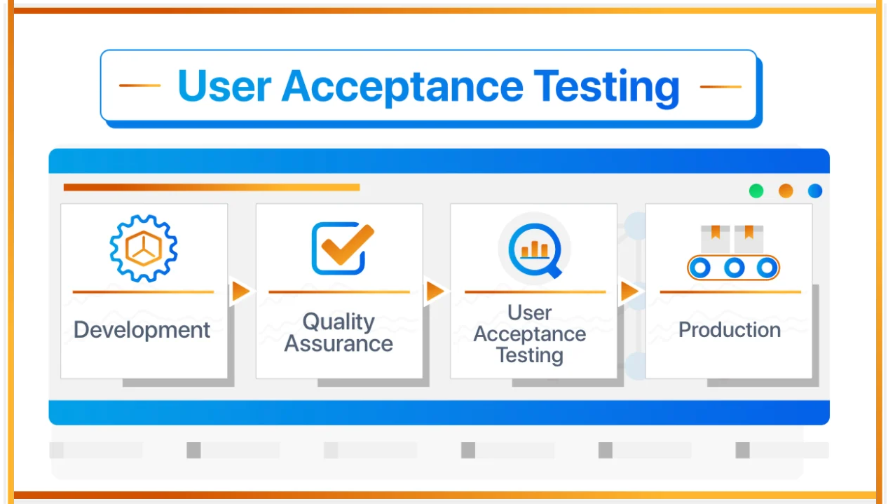
UAT is the last reality check. It’s when a company pauses and asks, “Does this actually do what we said it would?” and “Is it useful for the people we built it for?” Sure, developers and QA teams have already ironed out a bunch of problems, but UAT means looking at everything from the users’ perspective.
So why is UAT testing important and matters so much? Because it saves you from launching something nobody wants to use.
What is User Acceptance Testing?
User Acceptance Testing is a type of testing that is performed by business users, clients, or end users. In that all possible scenarios are checked. It is often considered the final validation phase before deployment to production. The main purpose of UAT is to confirm that:
- the software meets business requirements
- workflows function correctly
- users can complete tasks successfully
- the system behaves as expected in practical scenarios

QA testers check if creating a contact works the way it's supposed to under the hood. But when it's time for UAT, the people who actually use the system step in. They look at the whole customer onboarding process and see if it really fits the way they do business every day. It's less about “Does this button work?” and more about “Does this workflow make my life easier?”
Why User Acceptance Testing is Important
1. Make sure the Software Meets Business needs
Way too often, software works just fine from a technical perspective, but when people try to use it, something’s missing. Maybe the software product runs smoothly without any hassle, but if it doesn’t consider the real-world business problem, it’s a flop. That’s why UAT is so important before product release. UAT helps organizations confirm that:
- workflows support business operations
- reports generate correctly
- User permissions behave properly
- integrations function as expected
Business users are more aware of day-to-day operations than developers, making their feedback extremely valuable during this UAT phase.
2. Identifies Real-World Workflow Issues
Many defects only appear when software is used in real business scenarios. These issues are difficult to detect during development or software test automation services, for example:
- incorrect approval workflows
- missing notification emails
- payment failures
- confusing navigation
- incomplete onboarding flows
Consider a SaaS onboarding system where payment succeeds but onboarding emails fail to trigger. Technically, the payment module may pass testing, but from a business perspective, the onboarding process is incomplete. UAT helps identify such workflow gaps.
3. Improves User Experience
A technically correct application may still frustrate users if the interface is confusing or inefficient. During UAT, real users evaluate:
- usability
- navigation flow
- form behavior
- accessibility
- clarity of instructions
For example, if users repeatedly struggle to locate the “Enable” button because of poor UI placement, UAT can identify this issue early. Making such improvements before launch increases user satisfaction significantly.
4. Reduces Production Risks
Deploying software without proper UAT increases the risk of:
- production failures
- customer complaints
- revenue loss
- operational disruption
UAT acts as a safety layer that helps organizations detect critical issues before customers encounter them. Real-world examples of production risks include:
- broken payment integrations
- failed API communication
- incorrect user permissions
- missing business validations
- failed onboarding automation
Finding these issues after deployment can damage business reputation and increase support costs.
5. Builds Confidence Among Stakeholders
Business stakeholders and management teams generally depend on UAT testing to release the product into production. Successful UAT:
- builds trust in the development team
- confirms business readiness
- provides deployment confidence
- reduces uncertainty during launch
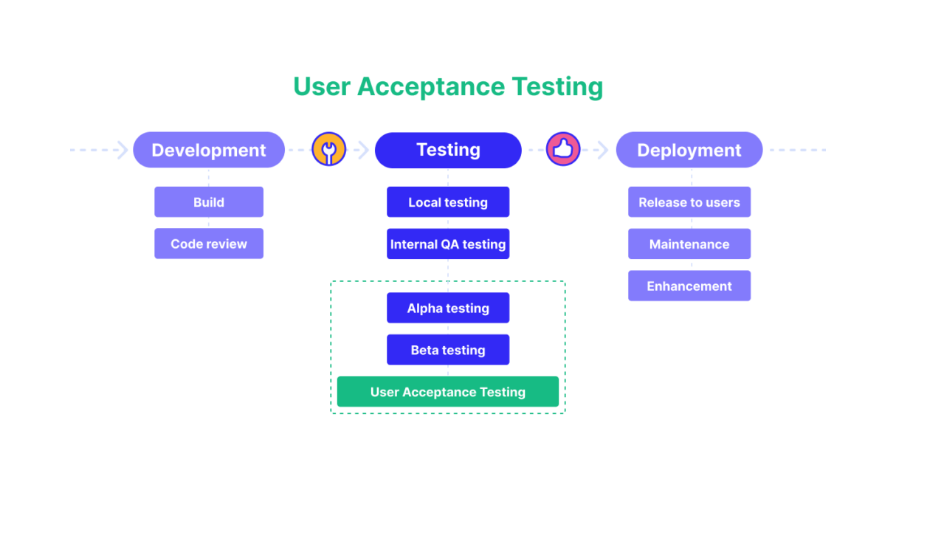
QA testing and UAT both care about quality, but they’re not aiming for the same thing.
| QA Testing | User Acceptance Testing |
| Performed by QA team | Performed by business/end users |
| Focuses on technical correctness | Focuses on business usability |
| Tests features and functionality | Tests real-world workflows |
| Finds system defects | Validates business expectations |
| Happens during development cycle | Happens before production release |
Both testing phases are equally important for successful software delivery.
Common Scenarios Covered in UAT
User Acceptance Testing usually includes:
- login and user authentication
- payment processing
- CRM workflows
- onboarding processes
- email notifications
- reporting and dashboards
- approval workflows
- subscription management
- role-based access control
- mobile responsiveness
These days, SaaS apps handle some pretty complicated stuff.
Challenges in User Acceptance Testing
Of course, UAT’s valuable, but it can trip up teams for all kinds of reasons. The actual rollout isn’t always smooth sailing.
1. Lack of Business User Availability
Business users are often busy with operational work and may not allocate enough time for testing.
2. Unclear Acceptance Criteria
Without clear expectations, testers may struggle to determine whether a feature is acceptable.
3. Incomplete Test Data
Realistic business data is necessary for effective UAT.
4. Limited Testing Time
Some software testing firms release the product without the UAT, increasing the risk of production issues.
5. Communication Gaps
When software teams work without planning and with communication gaps, testing often takes a hit.
It’s really all about good planning and actually working together. That’s how you get past these roadblocks.
So, how do you make User Acceptance Testing really work?
Here are some straightforward best practices teams should keep in mind: To maximise the effectiveness of User Acceptance Testing, software testing services company should follow these best practices:
Involve Business Users Early
Engage users during requirement discussions and planning stages.
Use Realistic Test Scenarios
Test actual workflows that users perform daily.
Prepare Proper Test Data
Use production-like data for accurate validation.
Define Clear Acceptance Criteria
Clearly specify what defines a successful outcome.
Track Issues Properly
Document defects, feedback, and improvement suggestions systematically.
Test End-to-End Workflows
Validate the complete business process rather than isolated features.
The Future of User Acceptance Testing
As organisations increasingly adopt AI technology, cloud platforms, SaaS applications, and automation tools, UAT is becoming even more important before product release. Modern applications involve:
- complex integrations
- real-time data synchronization
- automated workflows
- multi-platform accessibility
The Conclusion
User Acceptance Testing isn’t some boring formality. It’s the final checkpoint before your software faces the real world. Developers and QA teams spend hours squashing bugs and polishing the technical stuff, but UAT is when actual users step in and say whether the thing really works for them. It’s the moment you find out if the software does what the business needs.
When a team takes UAT seriously, they spot those weird workflow issues, smooth out rough edges for users, and head off unwanted surprises after launch. People walk away feeling good about the product. Honestly, UAT decides if your software does its job or falls flat.