The QA Guide to CRM Integration Testing
TL;DR
CRM Integration Testing ensures that applications and CRM platforms like Salesforce, HubSpot, Zoho CRM, and GoHighLevel exchange data accurately and reliably. It helps prevent issues such as missing leads, duplicate contacts, incorrect pipeline stages, failed automations, and inaccurate reporting. QA teams validate data synchronization, record creation and updates, duplicate prevention, workflow automations, and pipeline movements to ensure end-to-end business processes work as expected. By identifying integration issues before production, CRM Integration Testing improves data accuracy, customer experience, and overall business efficiency.
Introduction
Today most software programs do not work by themselves. Companies use different systems to keep track of customer information,make things easier, follow what is happening with sales, and talk to customers. They use things like Salesforce, HubSpot, Zoho CRM, and GoHighLevel to keep all customer information and business work in one place.
When applications integrate with a Customer Relationship Management system, it is important that the data is synchronized correctly. If there are tiny problems, this can cause things like leads togo missing, contacts to be duplicated in the pipeline, stages to be wrong, automations to fail and reports to be inaccurate. This will have an impact on how the business operates overall with the Customer Relationship Management system.
This is where CRM Integration Testing plays an important role. It helps verify that connected systems communicate properly and that business processes continue to work as expected from start to finishthrough effective Software Testing practices.
What is CRM Integration Testing?
CRM Integration Testing is the process of validating that data is correctly transferred between an application and a CRM system. The objective is to ensure that:
- Records are created successfully.
- Existing records are updated correctly.
- Data remains consistent across systems.
- Automations are triggered properly.
- Business workflows function without interruption.
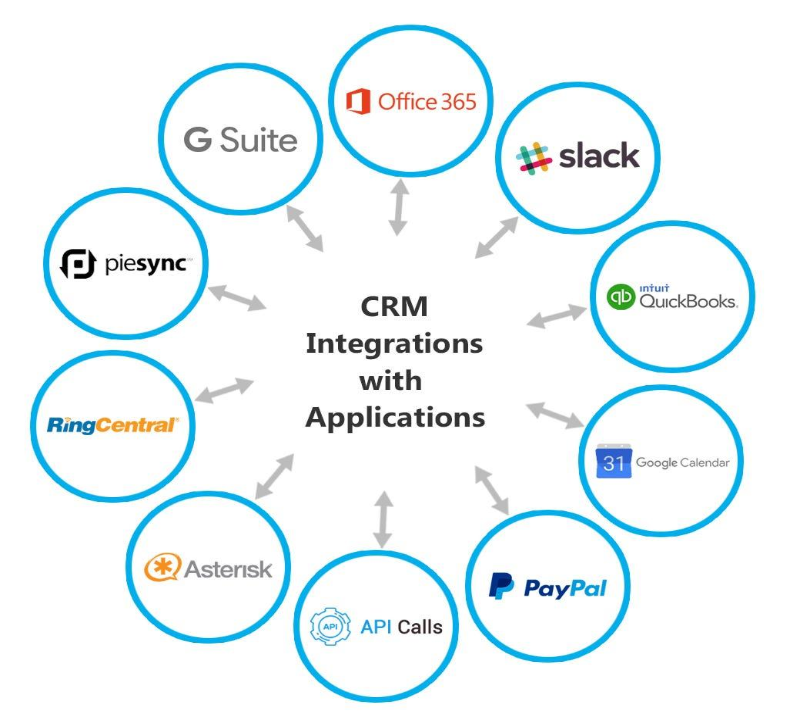
When we talk about CRM Integration Testing, we are not just looking at one thing. We are looking at how all the connected platforms work.
For example, when someone fills out a registration form, the application does a thing. It makes a customer record it and sends the information to the CRM. It updates the pipeline stage. It sends out automated emails. The people who test this have to make sure every step of the CRM Integration works the way it should.
Why CRM Integration Testing Matters
Many problems happen during production because systems do not talk to each other properly. This is not because the application is faulty.
For instance, a customer fills out a registration form, and it seems to work fine. However, the information does not reach the CRM because of an integration problem. Without dedicated integration testing services, a business risks missing out on valuable customers even though the application appeared to work correctly on the surface.
Similarly, incorrect field mappings can store customer data in the wrong fields, and failed automations can prevent important communications from being sent. Benefits of CRM Integration Testing include:
- Ensuresaccurate data synchronization.
- Prevents duplicate records.
- Validates complete business workflows.
- Detects integration issues early.
- Improves reporting accuracy.
- Enhances customer experience.
- Reduces production defects.
Data Syncronization
Verify that data entered in the application is transferred accurately to the CRM. Common fields include:
- First Name
- Last Name
- Email Address
- Phone Number
- Status
Custom Fields
The information should match exactly in both systems.
Record Creation
Verify that new records are created successfully in the CRM.
Check:
- Required fields
- Field mappings
- Data accuracy
- Record ownership
- Record Updates
Verify that updates made in the application are reflected correctly in the CRM.
Examples include:
- Name changes
- Email updates
- Status updates
- Contact information changes
- Duplicate Prevention
Duplicate contacts are one of the most common integration issues.
Verify:
- Existing email submissions
- Multiple form submissions
- Duplicate prevention rules
- Pipeline Stage Validation
Many businesses rely on CRM pipelines to track customer progress.
Verify:
- Correct stage assignment
- Automatic stage updates
- Business rule validations
- Workflow Automation
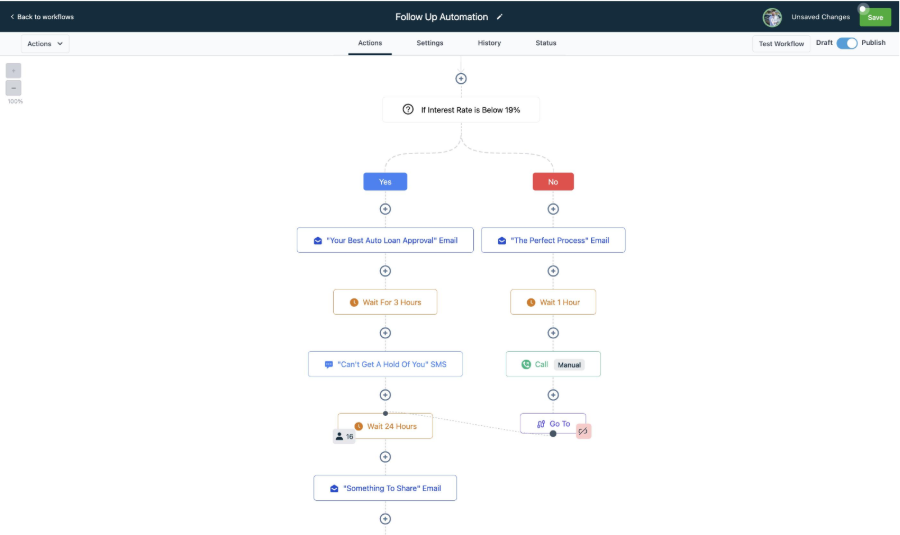
Many CRM actions trigger automated processes. Examples include:
- Welcome emails
- Follow-up emails
- SMS notifications
- Internal alerts
- Task creation
QA should ensure these automations are executed correctly when the required conditions are met.
Real-World Example
Recently, we worked on testing an application that synchronized customer registrations with a CRM platform.The workflow was simple:
- User submits a registration form.
- Customer record is created.
- CRM contact is created.
- Pipeline stage is updated.
- Automated emails are triggered.
Although the process seemed straightforward, testing identified several risks:
- Missing field mappings
- Incorrect pipeline stages
- Delayed synchronization
- Duplicate contacts
- Workflow automation failures
Without proper CRM Integration Testing, these issues could have reached production and impacted business operations.
Important CRM Integration Test Scenarios
Scenario 1: New Contact Creation
Steps
- Create a new customer record.
- Trigger synchronization.
- Verify the CRM contact.
- Expected Result
A new contact should be created in the CRM with accurate information.
Scenario 2: Existing Contact Update
Steps
- Update customer information.
- Trigger synchronization.
- Verify the CRM record.
- Expected Result
The existing CRM contact should be updated successfully.
Scenario 3: Duplicate Prevention
Steps
- Submit information using an existing email address.
- Trigger synchronization.
- Expected Result
The CRM should follow the configured duplicate handling rules.
Scenario 4: Workflow Automation
Steps
- Create a qualifying record.
- Trigger CRM automation.
- Expected Result
Configured emails, notifications, and tasks should be executed successfully.
Scenario 5: Pipeline Movement
Steps
- Perform actions that trigger stage changes.
- Verify the CRM pipeline.
- Expected Result
The contact should move to the correct pipeline stage.
Common Challengein CRM Integration Testing
Some integrations process data after a delay rather than instantly.
- QA should verify:
- Processing delays
- Retry mechanisms
- Queue processing
- Environment Differences
Stage and Production environments may have different CRM configurations.
Validate:
- Pipeline stages
- Workflow configurations
- Custom fields
- User permissions
- Third-Party Dependencies
Many integrations rely on APIs, webhooks, and external services.A failure in any dependency can affect the complete workflow.
The Conclusion
CRM Integration Testing is more than making sure data gets from one system to another. It makes sure that the whole business process works the way it should acrossdifferent platforms. CRM Integration Testing is important because it helps keep everything running smoothly
A good CRM integration needs data sync, right field connections, dependable automations, accurate pipeline handling and steady reportingall of which should be validated through proper Software Testing. When checking workflows instead of single steps, QA teams can spot problems sooner and lower the chances of failures in production. This way they can make sure everything works as expected before itslive. Validating workflows helps catch errors early on. It also helps teams fix issues before they become problems.
As modern applications become increasingly connected, CRM testing remains one of the most critical integration testing services in software quality assurance and a valuable skill for every QA professional.