
Mobile Test Automation with Appium: A Beginner to Advanced Guide
Introduction
Mobile applications are really important these days. So, it is very important that they work perfectly on all kinds of devices and operating systems. Testing these applications by hand is not enough because new versions are coming out quickly. This is why mobile test automation is a must for companies that make software. There are tools that can help with automation. One of the well-known tools is Appium. It is used to automate applications. If you are just starting to learn about automation testing, you will learn about the basics of Appium and also about advanced things you can do with it.
Why Mobile Test Automation Matters
Mobile users these days expect mobile apps to be really fast and work well. They want apps that do not have any problems. If there is a tiny issue, with a mobile app it can give mobile apps bad ratings. This makes customers unhappy. Can also cause the people who made the mobile app to lose money.
Mobile test automation helps organizations to:
1. Reduce testing time
2. Improve test coverage
3. Detect defects earlier
4. Accelerate release cycles
5. Ensure consistent user experiences across devices
Many businesses partner with an experienced Android App Testing Company or iOS app testing company to streamline their mobile testing efforts and improve application quality.

What is Appium?
Appium is a free, open-source tool that helps test applications on Android and iOS devices. We use it to test all types of applications like Android apps, iOS apps, and web apps. Appium is useful because it supports all these languages, like Java, Python, Ruby, JavaScript, and C#.
Key Features of Appium
1. Open. Free to use.
2. Cross platform that supports both Android and iOS.
3. Supports all devices, emulators and simulators.
4. No need to modify application source code.
Appium Architecture Overview
Appium follows a client server architecture.
Components:
1. Appium Client
a. Test scripts written in Java, Python, or another supported language.
2. Appium Server
a. Receives automation commands and converts them into platform specific actions.
3. Mobile Device or Emulator
a. Android emulator, iOS simulator, or real device.
Workflow
1. Test script sends commands.
2. Appium server receives requests.
3. Commands are translated into platform specific automation instructions.
4. Actions are performed on the device.
5. Results are returned to the test script.
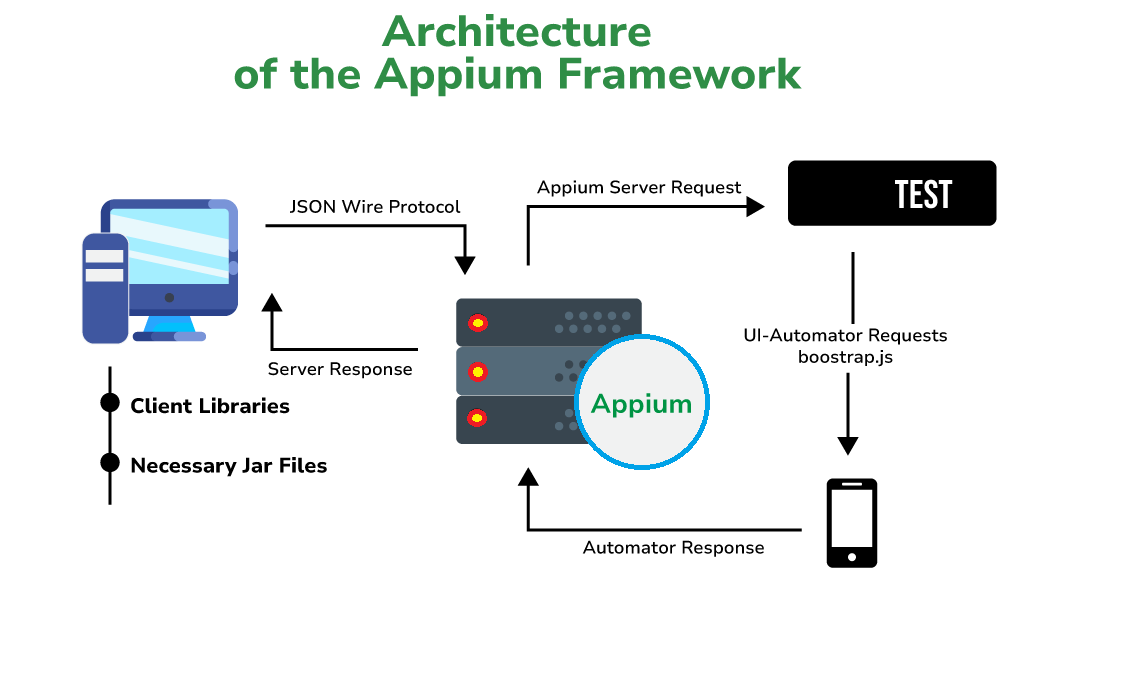
Image: Appium Workflow
Setting Up Appium for Beginners
Prerequisites
Before installing Appium, ensure you have:
1. Java JDK
2. Android Studio
3. Android SDK
4. Node.js
5. Appium Server
6. Appium Inspector
7. Maven
8. TestNG or JUnit
Creating Your First Appium Test
A basic Appium test typically involves:
- Launching the application
- Locating UI elements
- Performing actions
- Verifying expected outcomes
Example scenarios:
- Login functionality
- Product search
- Form submission
- User registration
Locator Strategies in Appium
Selecting the right locator strategy is critical for stable automation.
Recommended Locators
Accessibility ID
Most reliable and fastest.
MobileBy.AccessibilityId("Login")
Resource ID
Ideal for Android applications.
By.id("com.app:id/login")
XPath
Useful but slower.
By.xpath("//android.widget.Button")
Best practice: Use Accessibility IDs whenever possible.
Android Automation Testing with Appium
Android devices have screen sizes, and they are made by different companies. They also have versions of the operating system. This makes it really hard to make sure everything works the same on all Android devices. That is where automation testing comes in. It helps make sure that Android devices work the way no matter what size screen they have or who made them or what version of the operating system they are using. This way people can use Android devices without worrying about things not working right. Android devices are used by a lot of people, and automation testing helps make sure they all work well.
Common Android testing scenarios include:
1. App installation testing
2. UI validation
3. Functional testing
4. Push notification testing
5. Device compatibility testing
6. Performance validation
An experienced Android App Testing Company can help organizations validate applications across hundreds of device combinations efficiently.
iPhone Automation Testing Using Appium
The demand for iphone automation testing continues to grow as businesses target premium iOS users. For iOS automation, Appium utilizes Apple's XCUITest framework behind the scenes.
iOS Testing Requirements
- macOS machine
- Xcode installed
- iOS Simulator
- Apple Developer certificates (for real devices)
Common iOS automation scenarios include:
- Login testing
- Payment workflow testing
- Navigation testing
- Notification testing
- Accessibility validation
Organizations often collaborate with an established iOS app testing company to ensure applications deliver seamless experiences across iPhones and iPads.
Advanced Appium Techniques
1. Data-Driven Testing
Store test data in:
- Excel
- CSV
- JSON
- Databases
This improves maintainability and scalability.
2. Page Object Model (POM)
POM separates page elements from test logic, making scripts easier to maintain.
Benefits include:
- Reduced code duplication
- Better readability
- Easier updates
3. Parallel Execution
Run tests simultaneously across multiple devices.
Benefits:
- Faster execution
- Reduced regression testing time
- Better device coverage
4. Cloud Device Testing
Platforms like Browser Stack and Sauce Labs provide access to real devices without maintaining physical device labs.
5. CI/CD Integration
Integrate Appium with:
- Jenkins
- GitHub Actions
- Azure DevOps
- GitLab CI/CD
This enables automated testing with every code deployment.
Common Challenges in Mobile Test Automation
Device Fragmentation
Hundreds of Android devices and OS versions must be supported.
Dynamic Elements
UI elements may change frequently.
Network Dependency
Applications behave differently under varying network conditions.
Test Maintenance
Frequent application updates can break automation scripts.
To overcome these challenges, teams should adopt robust automation frameworks, stable locator strategies, and continuous maintenance practices.
Best Practices for Appium Automation
1. Use Accessibility IDs whenever possible.
2. Follow Page Object Model design.
3. Maintain reusable utility functions.
4. Execute tests on real devices.
5. Integrate with CI/CD pipelines.
6. Keep test scripts independently.
7. Generate detailed execution reports.
8. Perform regular framework maintenance.
Why Businesses Choose Professional Mobile Testing Services
Building your testing system for apps can be really expensive and take a lot of time. A lot of companies like to work with a company that specializes in testing Android apps or a company that tests iOS apps. This is because they want to work with people who're really good at testing and have access, to a lot of different devices and tools that can automatically test apps. Working with a testing company that knows what they are doing can help you get your app out faster. It also helps make sure that people have an experience when they use your Android app or your iOS app.
Conclusion
Mobile test automation is really important for developing applications. Appium is a tool for automating Android and iOS applications because it is powerful, flexible and does not cost a lot. Whether you are just starting to automate tests or you are using testing methods Appium has the tools you need to make your software better and get it to users faster.
Appium is used for lots of things like testing iphone applications and making sure Android applications work correctly for companies. Appium is a choice, for companies that need to automate mobile applications because it is reliable and can handle a lot of work. When teams use testing methods, strong frameworks and test their applications all the time they can make great mobile applications that people will love and they can do it without wasting time or sacrificing quality. Appium is a part of making this happen for mobile test automation.