
Mastering Selenium Testing: A Comprehensive Guide to Cucumber BDD Framework

Cucumber, a powerful Behavior-Driven Development (BDD) framework, synergizes seamlessly with Selenium, a widely-used web testing tool, to form a potent combination for efficient software testing. Cucumber employs a Gherkin syntax that enables stakeholders to articulate test scenarios in plain language, enhancing collaboration between technical and non-technical team members. Teams facing similar quality risks often use selenium test automation services to validate these areas before release.
Integrated with Selenium, Cucumber facilitates end-to-end testing of web applications by automating interactions with web elements. This dynamic duo empowers teams to create and execute feature-rich, readable test scripts, ensuring comprehensive test coverage and accelerating the development lifecycle. The fusion of Cucumber and Selenium exemplifies a robust approach to achieving reliable and maintainable test automation.
Table of Contents
- What is BDD?
- Why Cucumber?
- Advantages of Cucumber
- Setup Cucumber Framework Project in Eclipse
- Salient features of Cucumber
- Conclusion
What is BDD?
BDD (Behavior Driven Development) is a framework where you can translate specifications or tests using simple English sentences using the Gherkin language. With this technique, non-technical members can easily understand the software development process and collaborate with other team members easily.
BDD is a framework that bridges the gap between people involved in cognitive and non-procedural processes with the help of English language testing. It helps stakeholders track the project through test scenarios.
Why Cucumber?
Cucumber is one of the most famous automation tools because of the following reasons.
- Cucumber BDD is an open-source automation tool.
- Cucumber Framework supports multiple languages such as Java, Python, Ruby, .NET, etc.
- Cucumber supports BDD automation and can be easily integrated with Selenium, Waitr, Ruby on Rails, and other web-based testing tools.

Advantages of Cucumber
It's helpful to communicate with partners who can't read numbers.
- It focuses on end-user experience.
- The structure allows easy code reusability.
- Quick and easy Setup & Execution.
- An efficient tool for testing.
- Open-source automation tool & supports different languages.
Now let's set up the Cucumber Framework in the Eclipse. Follow the below points and start your coding in the framework.
Setup Cucumber Framework Project in Eclipse
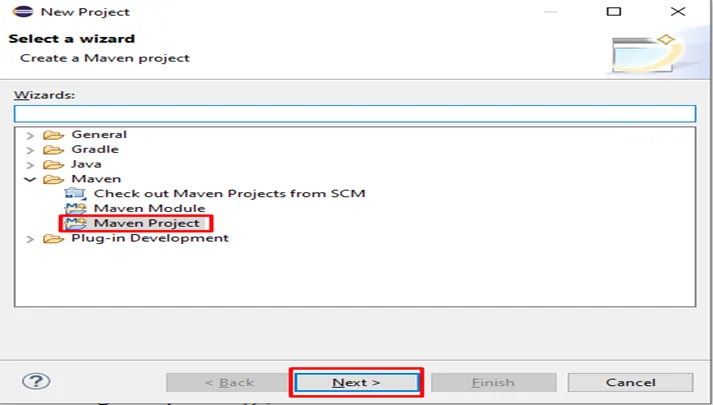
Step 1: Create Maven Project in Eclipse
Eclipse > File > Project > Select Maven Project > Click on Next button
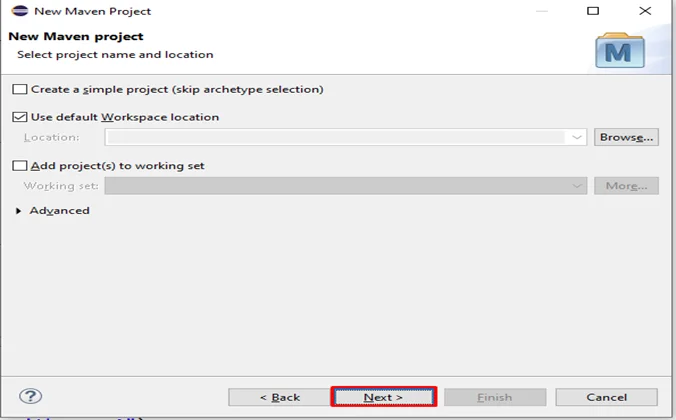
Step 2: Click on the Next button
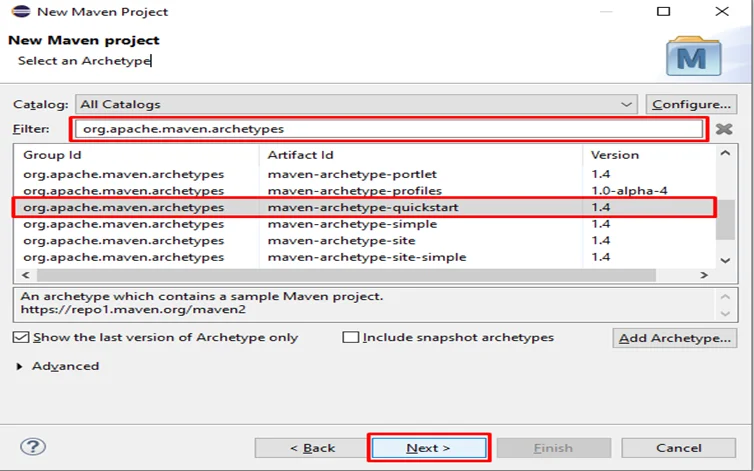
Step 3: Select an Archetype – type “org.apache.maven.archetypes” in the Filter input field select and select the highlighted option and click on the Next button.
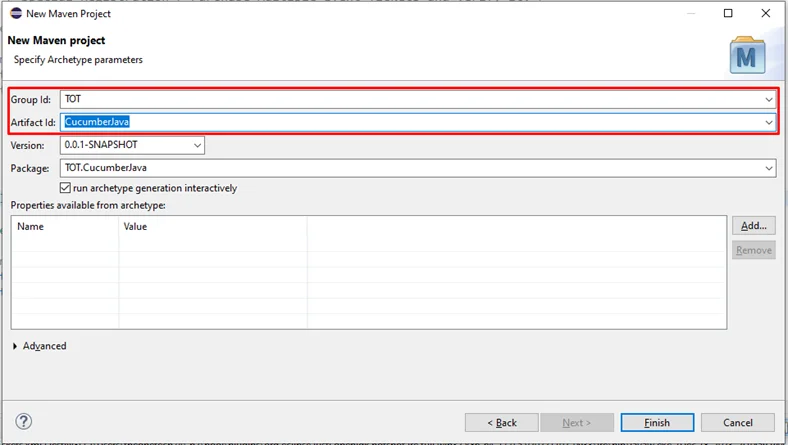
Step 4: Enter Group ID & Artifact ID and Click on the Next button
Group Id- Name of the Company or Group, Artifact Id- Name of the Project
Step 5: Wait for few seconds, Eclipse Creating the project & enter “Y” in the Console & press Enter.
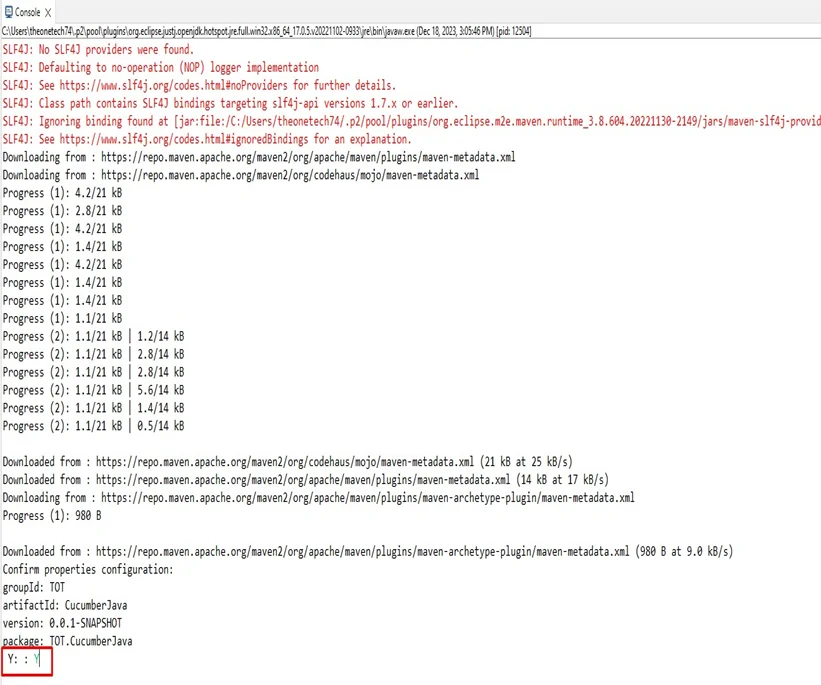
Now the Project is ready to use.
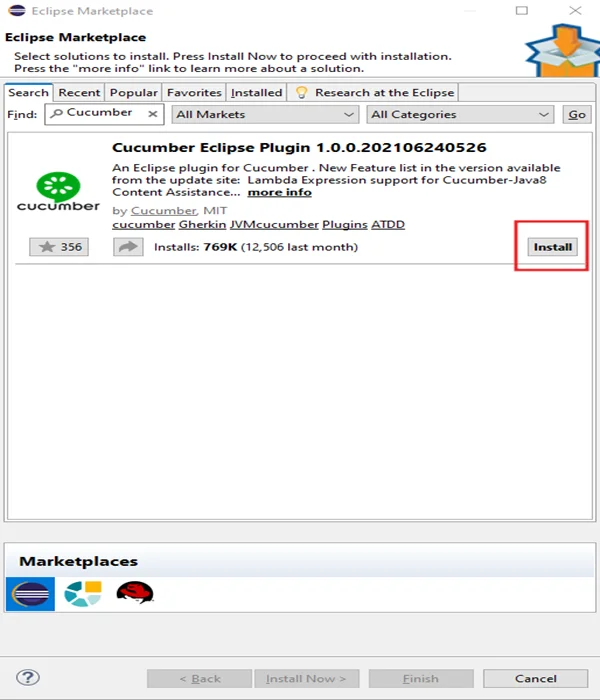
Step 6: Download Cucumber Plugin. Eclipse > Help > Eclipse Marketplace. Search for Cucumber, click on Install, and wait for a few seconds.
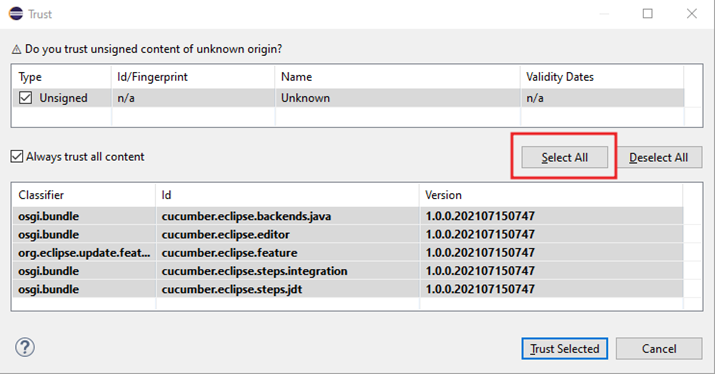
Step 7: Select the Checkbox and click on Select All button
Step 8: Click on “Install anyway “.
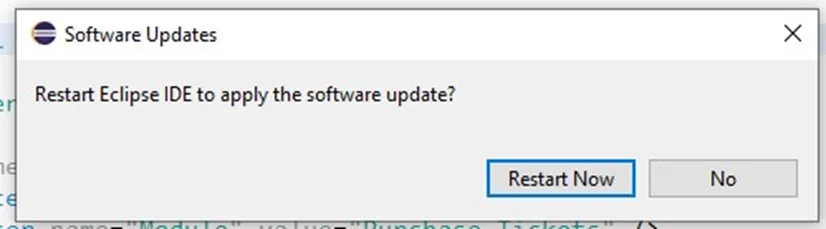
Step 9: After the installation, a pop-up will appear, click on the “Restart Now” button
Step 10: Now, Add the required dependencies to the pom.xml file under the dependencies tag and save the xml file. go to Maven Repository and search for Selenium, Junit Api, Cucumber Java, etc.
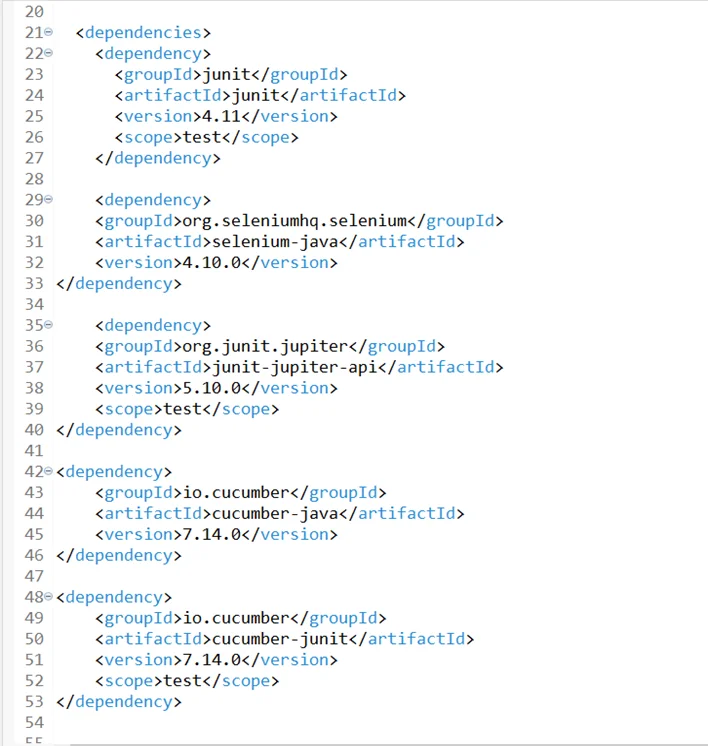
Step 11: Install the Natural plugin in Eclipse to understand the basic Gherkin syntax.
Watch this video to install
Step 12: Now convert the maven project into cucumber.
Right-click on project > Configure > Convert to Cucumber Project.
Till now we have followed the steps to implement the Cucumber framework, now we will see the salient features of the Cucumber and how they are used.
Salient features of Cucumber
- Feature File:
Keywords used in the Feature file are:
- Feature
- Background
- Scenario
- Scenario outline
- Given
- When
- Then
- And
- Example
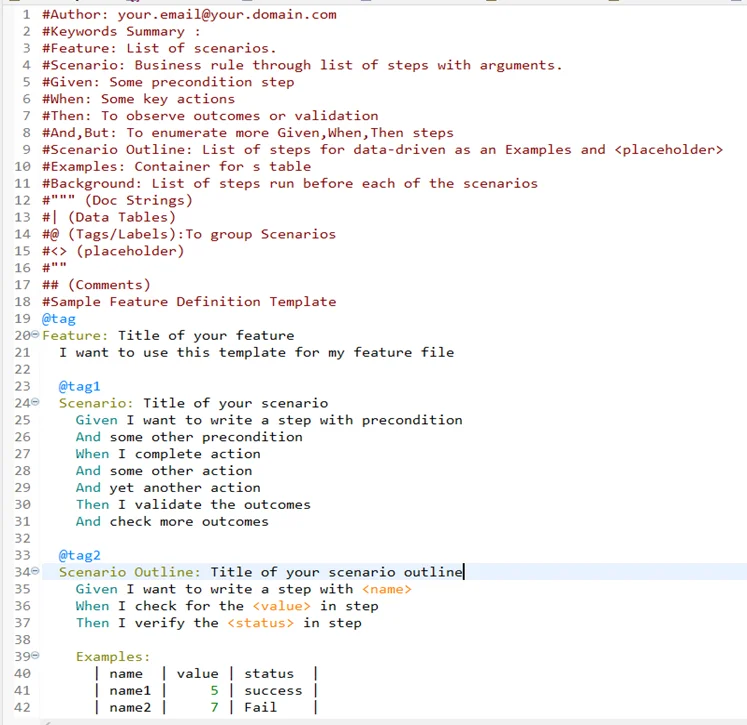
- Feature: The feature defines the logical test functionality that is going to be tested.
- Background: It is used to define steps that are common to all the tests in the feature file.
- Scenario: Each test is called a Scenario and is described using the Scenario: keyword.
- Scenario outline: It is used when the same scenario is to be executed with various combinations of values or arguments.
- Given: It defines a precondition to the test.
- When: It defines the test action that will be executed.
- Then: It defines the Outcome of the previous steps.
- And: This keyword is used to add conditions to your steps.
- But: It is used to add negative type comments.
- Example: It is used along with Scenario Outline to specify the values to be replaced with placeholders.
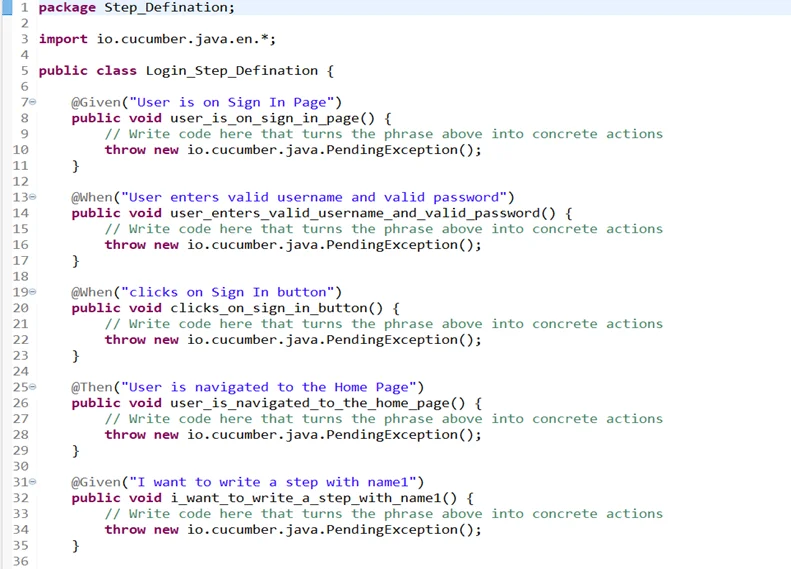
- Step Definition Class:
A Step Definition Class is a class that contains the implementation of each step of scenarios. It is the coding representation of each scenario step.
- Test Runner Class:
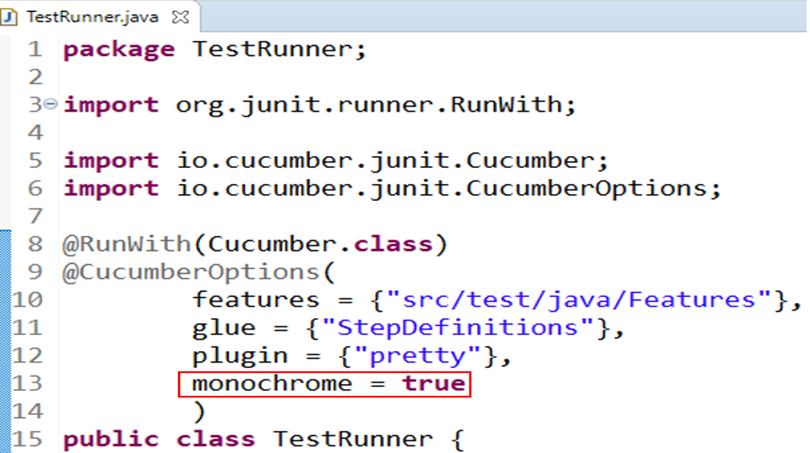
As Cucumber uses Junit, we need to have a Test Runner class. This class will use the Junit annotation @RunWith(), which tells JUnit what the test runner class is.
- “glue” keyword is used to show the “StepDefination” is exactly located in the TestRunner.
- Just mention the name of the “StepDefinitions” package folder.
- Save the TestRunner file.
- Execute the TestRunner file as JUnit test.
We can see the respective Give/When/Then steps in the console by printing the pretty output.
To make the console o/p further readable, add the ‘Monochrome’ option.
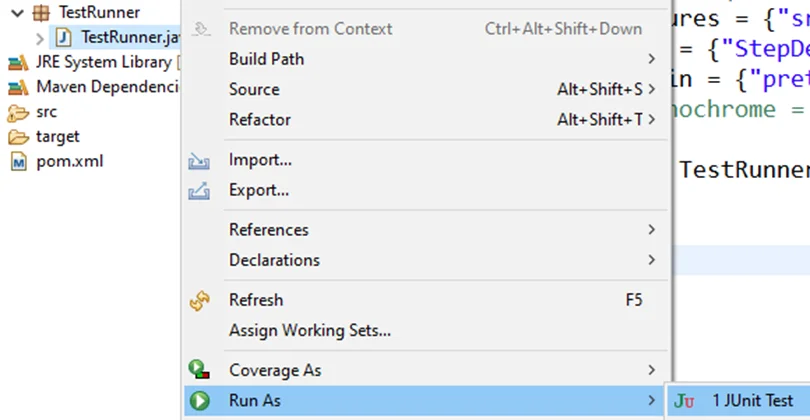
Right-click TestRunner.java > Run As > Junit Test & see the Console
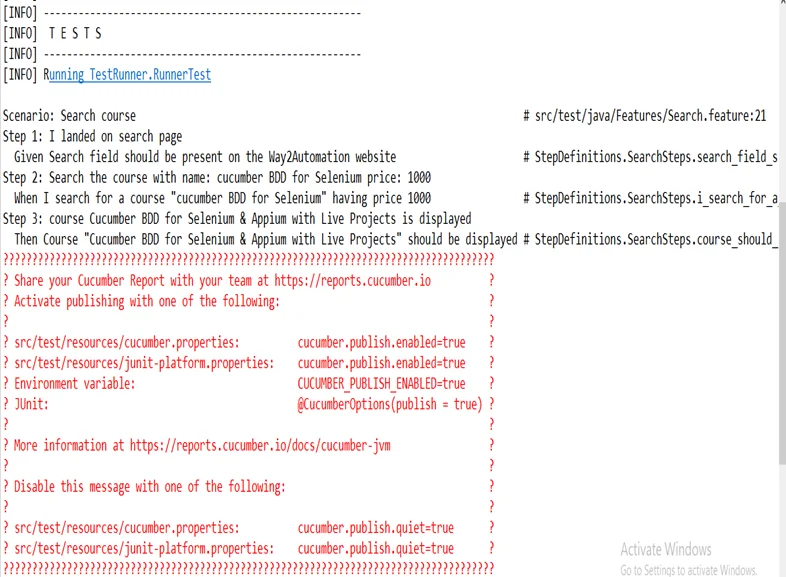
Execute runner file as Maven Test
Right-click project > Run As > Maven test and see the console output as:
Conclusion
BDD (Behavior Driven Development) is a way of translating specific instructions or tests using simple English sentences using the Gherkin language. Thanks to this technology, non-proprietary members can easily understand. Using the Gherkin language, we can create a function file that defines the steps, step functions, and events.
About Author

Set the baby steps in 2019 as a trainee in manual testing, Shubham Pardhe has now become an experienced QA executive in PixelQA a Software Testing Company.
His professional goal is to become an expert in test management tools.